
React Developer’s Cheat Sheet to Flutter Lifecycles
Flutter lifecycle mapping React – that’s the key to fast learning.ntal shift is thinking in widgets instead of components and understanding how lifecycle events map across ecosystems.
This article compares the latest React lifecycle model (Hooks-based) with the Flutter widget lifecycle, in a way that helps React developers transfer existing knowledge instead of starting from zero.
Why React Developers Should Care About Flutter in 2026
Flutter is no longer “just mobile”.
In 2026, Flutter is widely used for:
• Android and iOS apps
• Web applications
• Desktop apps (Windows, macOS, Linux)
• Embedded and POS systems
For React developers, Flutter offers:
• Single codebase for multiple platforms
• Predictable UI rendering
• Strong performance without a virtual DOM
• Tight control over UI and animations
Learning Flutter becomes easier once you realize the lifecycle concepts are familiar, just expressed differently.
Mental Model Shift: Components vs Widgets
React | Flutter
Component | Widget
JSX | Widget Tree
Virtual DOM | Element Tree
Re-render | Rebuild
Key truth: Flutter rebuilds often, but it is cheap.
React developers often fear rebuilds. In Flutter, rebuilds are expected.
Modern React Lifecycle (Hooks-Based) vs Flutter lifecycle mapping React
As of 2026, class components are legacy. Hooks are the standard.
Common lifecycle equivalents in React Hooks:
React Hook | Purpose
useState | Local state
useEffect | Side effects
useEffect(() => {}, []) | ComponentDidMount
useEffect(() => {}, [deps]) | ComponentDidUpdate
return () => cleanup | ComponentWillUnmount
useRef | Persistent value without re-render
useMemo / useCallback | Performance optimization
React lifecycle is effect-driven.
Flutter Widget Lifecycle (StatefulWidget)
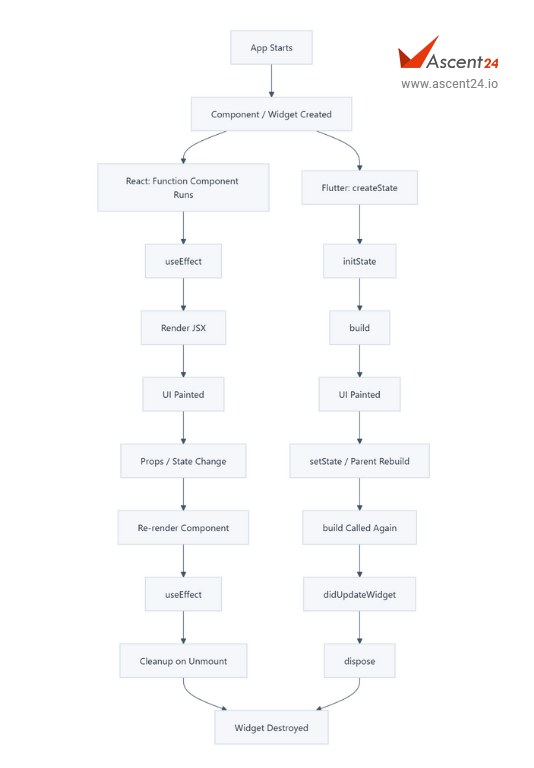
Flutter splits lifecycle into Widget lifecycle and State lifecycle.
- Widget Creation Phase
createSt ate()
Equivalent mindset: React component function execution (first render) - State Initialization
initState()
Flutter equivalent of:
useEffect(() => {
// on mount
}, [])
Use initState() for:
• API calls
• Controllers
• Subscriptions
• One-time setup
- Dependency Change
didChangeDependencies()
Closest React equivalent:
useEffect(() => {
}, [contextValue])
Triggered when:
• InheritedWidget changes
• Theme, locale, media query updates
- Build Phase (Rendering)
build(BuildContext context)
Equivalent to:
React render function return
Important difference:
• Flutter calls build frequently
• Build must be pure and fast
• No side effects here
Rule: If you would not put it inside JSX, do not put it inside build()
- Widget Update
didUpdateWidget(oldWidget)
Equivalent to:
useEffect(() => {
}, [props])
Triggered when:
• Parent rebuilds with new configuration
• Same widget, new parameters
- Cleanup
dispose()
Equivalent to:
useEffect(() => {
return () => cleanup()
}, [])
Use for:
• Controllers
• Streams
• Listeners
• Animation cleanup
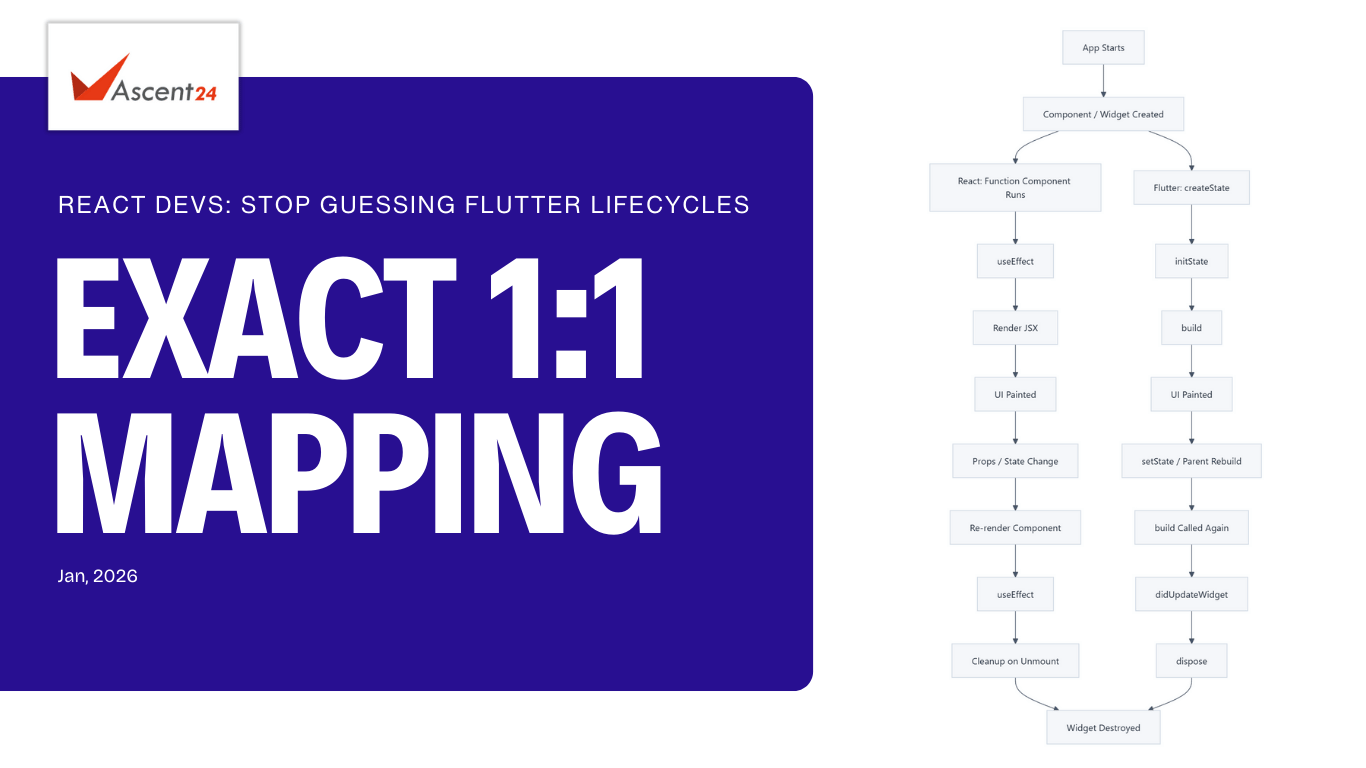
React vs Flutter Lifecycle Mapping (Cheat Sheet)
React (Hooks) | Flutter
Component render | build()
useEffect([]) | initState()
useEffect([deps]) | didUpdateWidget()
Context update | didChangeDependencies()
Cleanup function | dispose()
useRef | late variables / controllers
memo | const widgets / keys
State Management Comparison (2026 Reality)
React World:
• useState
• useReducer
• Redux Toolkit
• Zustand
• React Query / TanStack Query
Flutter World:
• setState (local)
• Provider
• Riverpod (dominant in 2026)
• Bloc
• Signals (emerging)
Good news: If you understand React state flow, Riverpod will feel natural.
Performance Difference React Developers Must Understand
React:
• Virtual DOM diffing
• Reconciliation
• Memoization required for performance
Flutter:
• No virtual DOM
• Skia rendering engine
• Widget rebuild ≠ UI repaint
Result: Flutter feels closer to game UI architecture. React feels closer to document updates.
Common Mistakes React Developers Make in Flutter
• Doing API calls inside build()
• Fear of rebuilds
• Overusing global state early
• Treating widgets like DOM elements
• Not using const widgets
Through this approach, I am building strong Flutter expertise as a React developer at Ascent24 Technologies.
At Ascent24 Technologies, we help teams transition React developers to Flutter without productivity loss.
Our approach:
• Map React concepts directly to Flutter
• Focus on lifecycle parity
• Introduce Riverpod early
• Production-ready architecture from day one
If your team is planning Flutter adoption or cross-platform strategy, explore our engineering approach:
We work with startups and enterprises across India, US, UK, UAE, Singapore, and Canada, delivering scalable web and mobile solutions.
Final Advice for React Developers
Do not try to “rewrite React in Flutter”.
Instead:
• Accept the widget-first mindset
• Embrace rebuilds
• Trust the framework
• Leverage lifecycle properly
If you know React well, Flutter is not hard. It is just different.
Resources and References
To deepen your understanding of Flutter lifecycle and React Hooks, explore these authoritative resources:
Flutter Documentation:
https://flutter.dev/docs
React Official Documentation: https://react.dev
Riverpod State Management: https://riverpod.dev
Flutter Widget Lifecycle Guide: https://docs.flutter.dev/development/data-and-backend/state-mgmt/intro
Sathiyamoorthi C
Full Stack Developer
Team Ascent24 Technologies